Also, there is as an overview of the current state of the updates in Dashboard > Overview > expand Available Patches. Please let us know if you think that this view can be improved.
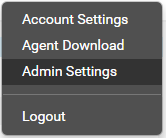
@Larry_Core , I apologize for my previous post, regarding the ability to send alerts to email on failure of patch install/reboot - this is already possible by going to the upper right hand corner menu > Admin Settings. You could also check this link in the help guide that will help you along the process. Please let us know if this is what you are looking for (also, keep in mind that if you have a lot of users added in Comodo One it might take for a little while to display the Users list).
Regarding the other feature request, this option is already available in CDM and in Patch Management the feature will be improved in the next PM upgrades.
Hello @Rickkee ,
I have escalated your request to the appropriate staff for further analysis. We will notify you as soon as we have any update on this.
Absolutely! And allow us to filter so we can see how many Critical/Important updates are needed without worrying about the Low/Unimportant ones.
Hello @PromptCare ,
Thank you for the feedback! We have contacted you by email to confirm the requests.
Feature Request: Edit Policy
Would be nice to have the option to edit a Patch Management Policy. Currently the only options are Delete and Create. The review option does not describe the settings as they are in the creation form. Please add an edit feature for when we need to make a change to an existing policy.
Thank You
Hello @michael2
We will forward the Feature Request to the Development team on your behalf. A ticket will be created and you will be updated there as well.
Thank you for the feedback on the Module.
It would be handy to be able to set an update window rather than a specific time for running updates as I support home users and its hard to know when those devices are actually going to be on.
If I could set a window of say 6PM - 12PM if a device comes online within that time period it would pick up the updates
Agreed. Or a check box to run if scheduled task is missed. For those who turn off the workstation. And have it run at next RMM status polling.
Hello,
We have forwarded your request for analysis. We will contact you via e-mail in order to keep you updated on the progress made regarding this.
Hello @dougaust ,
If a device is offline at the time a policy is supposed to run, it should pick it up the next time it comes back on so the updates will still be installed.
I will have to do some testing, I have a number of computers that are still showing as needing updates. I never seem to be on C1 at the same time as they are on to refresh to make sure. Looking at it, being a home system they are quite random on the times that they are likely to be on so its hard to pick a good time for the schedule to run
Hello @dougaust ,
Please let us know the outcome of the tests and if you need help with anything.
Hello @michael2 ,
Regarding the feature that you have requested (Possibility of editing policies in PM), we have implemented this feature in ITSM. Assuming that you have a device enrolled in ITSM you can create a patch procedure from Configuration Templates > Procedures > Create > Create Patch Procedure to install patches at scheduled times and from the same menu (Procedures) you can edit the procedure at a later time.
I would like PM to be able to oatch third party applications installed on base operating systems e.g, vmware, adobe, team viewer and the likes.
I would like PM to be able to Patch third party applications installed on base operating systems e.g, vmware, adobe, team viewer and the likes.
It is coming in a few months over ITSM as well. We already started working on that part as well.
Ilker
I know I put this over in the ITSM forum but I saw they had a dedicated patch management forum so I wanted to post it here as well:
It is a pity you are discontinuing the “Legacy” Patch Management module and migrating it over to ITSM. I like the standalone module mutch better than ITSM. It seems to work better for me, it supports more custom software, the GUI is a lot nicer, I love the color theme, it gives more variety to C1 platform, and the other features of the patch management application such as the memory and CPU usage and HDD usage visual gages as the top of the screen, and the charts and graphs, and all the different pages, sure the information on those pages might be available “somewhere” on ITSM or another feature, but on Patch Manager or “Legacy Patch Manager” it is so much easier to find and the reports have more information, they look nicer, you can generate a graph just by clicking on an application and see its status. You can toggle/approve items to globally install, or you can do it computer by computer. I saw something similar on ITSM but it is just not the same. The GUI is much more colorful, user friendly,(looks more like a Comodo product) and gives variety to C1, has various status icons all over that help give you a clear picture, whereas ITSM is all 1 color and more on the boring side, though I know you are constantly working to improve ITSM. I highly recommend keeping the current patch manager or moving it over into ITSM and integrating it with ITSM so they are together in one piece so we do not lose all these rich features. I do agree that having two separate agents on a endpoint is a bit silly when one agent should be able to do the trick, but the other agent seems to have a much more user-friendly GUI in my opinion. I’d really hate to lose it. In fact I use it every day. It’s only when there is a problem with a specific windows update that I resolve to using the ITSM patch management (as I stumbled on ITSM patch management by accident and didn’t even know it was there, and then I had the demo with the product engineer show it to me). Anyways, that’s my two bits,
So - taking these thoughts into account - perhaps you can take what you have in the current Patch Management console/module and program them into your ITSM patch management feature (with improvements/bug resolutions on current issues, etc.)
Hi @navcom
Thank you for good feedback. We are glad to hear that you are happy with our Patch Management portal.
You don’t need to worry. “Legacy” Patch Management would stay available until we have migrated every feature over to ITSM and confirm that you all are happy with it. We are aware, we are not there yet but rest assured, we are working day and night to come to that point.
I might also ask you (and also to @chales ) to try the new 3rd Party Application patching over ITSM and let us know your thoughts.
Ilker
Hello @Joners ,
Good input.
For your convenience, I`ll be creating a support ticket for further analysis.
I will also check if this is already part of the roadmap but
if not, we can consider this as a new feature request and we might be needing more information
on this.
Thank you for continue choosing Comodo One.