We are processing your request. I will let you know when completed.
Thanks,
Kannan
We are processing your request. I will let you know when completed.
Thanks,
Kannan
Hi @easterntech50,
Please use the script https://forum.mspconsortium.com/forum/script-library/8889-run-command-and-append-the-output-into-a-valid-shared-file-on-the-same-network for your request and let me know your valuable feedback.
Thank you.
Purushoth.
Great, thanks!
Hi @pcrd
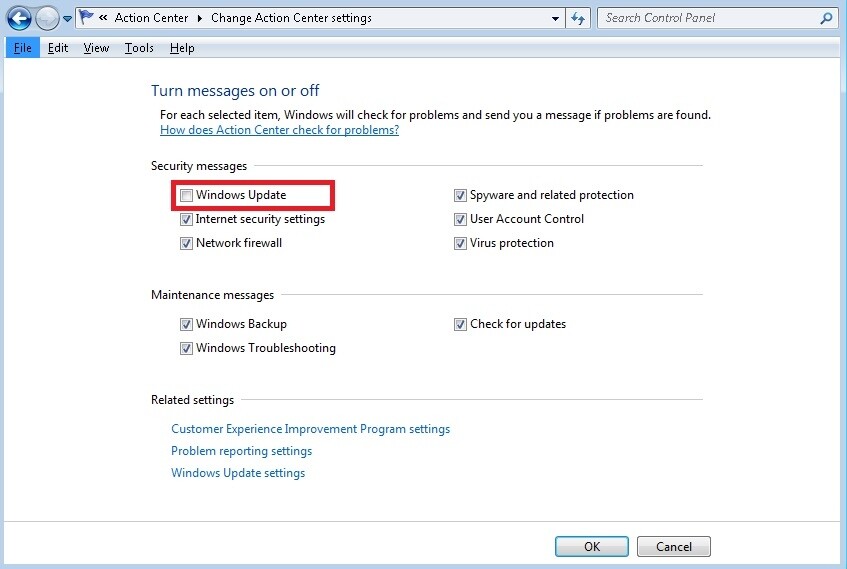
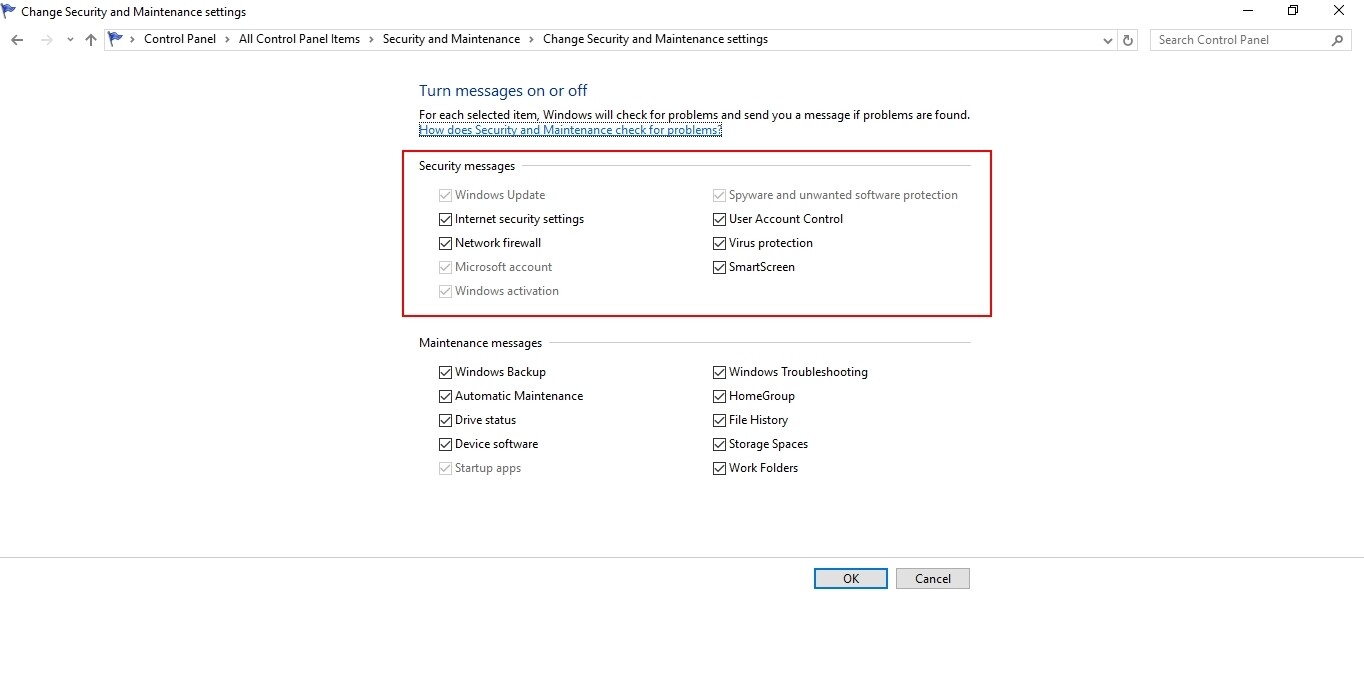
The second would be to turn off messages about Windows Update in the Action Center after installing the patch manager software.
Action center settings can’t be changed/managed by the script because corresponding registry entries are unique for every PC (and iteration). So we also don’t have a working solution for that.
It can be processed with user interaction only. Please refer below screenshots,
Thanks,
Kannan
Hi @rmorton
Please refer below link to add bookmarks in internet explorer browser,
https://forum.mspconsortium.com/foru…ernet-explorer
We didn’t find a way to efficiently manage bookmarks in Chrome and Firefox using available python module support.
Currently, we are writing a script to create URL bookmarks or shortcuts to all user desktop. This would enable user to open these websites on their default browser.
I will update you once completed.
Thanks,
Kannan
Hi @rmorton
Important:
The script should verify if the bookmark exist and only create if it doesn’t exist. It would be much more beneficial if the script would run through a list and not have to create a procedure for each bookmark.
Please refer below procedure to bookmark your url list on all user’s desktop
Thanks,
Kannan
How about this one: If the PC has not been rebooted in the last 14 days, prompt the user to reboot and do so once a day until is rebooted. And, if you can, combine that with a check for if Windows needs to reboot. So, if a PC needs to reboot at all, prompt the user and, if it’s been more than two weeks since the last reboot, ask them to do so.
Hi @PromptCare,
We will analyze the request and let you know once we complete the script.
Thank you.
Purushothaman
Hi @PromptCare,
Please use the script as per your request we have completed it,
def ecmd(CMD, OUT=False):
    import ctypes
    class disable_file_system_redirection:
        _disable = ctypes.windll.kernel32.Wow64DisableWow64FsRedirection
        _revert = ctypes.windll.kernel32.Wow64RevertWow64FsRedirection
        def __enter__(self):
            self.old_value = ctypes.c_long()
            self.success = self._disable(ctypes.byref(self.old_value))
        def __exit__(self, type, value, traceback):
            if self.success:
                self._revert(self.old_value)
    from subprocess import PIPE, Popen
    with disable_file_system_redirection():
        OBJ = Popen(CMD, shell = True, stdout = PIPE, stderr = PIPE)
    out, err = OBJ.communicate()
    return out.strip()


def wfile(fp, c):
    import os
    with open(fp, 'w') as f:
        f.write(c)
    if os.path.isfile(fp):
        return fp
    return

import os
import time
import socket
c=r'''Set objSysInfo = CreateObject("Microsoft.Update.SystemInfo")
Wscript.Echo "Reboot required? " & objSysInfo.RebootRequired'''
p=r'''$os = Get-WmiObject win32_operatingsystem
$uptime = (Get-Date) - ($os.ConvertToDateTime($os.lastbootuptime))
$uptime = (Get-Date) - ($os.ConvertToDateTime($os.lastbootuptime))
Write-Output $Uptime.Days'''

fp=os.path.join(os.environ['TEMP'], 'RebootRequired.vbs')
pf=os.path.join(os.environ['TEMP'], 'checkboottime.ps1')
file=wfile(fp, c)
filep=wfile(pf, p)

vbsout=ecmd('cscript "'+file+'"')
pcmd='PowerShell.exe -ExecutionPolicy Bypass -File %s'%(filep)
psout=int(ecmd(pcmd))

tim=time.strftime('%d/%m/%Y %H:%M')
cn=os.environ['COMPUTERNAME']
ip=socket.gethostbyname(socket.gethostname())
print 'Date and Time:', tim
print 'Machine Info:', cn+' - '+ip
print '-'*40+'
'

if 'Reboot required? False' in vbsout and psout<14:
    print 'The endpoint does not require a reboot :)'
    print 'The endpoint does not require a reboot :)
'
elif 'Reboot required? True' in vbsout or psout>=14:
    input_text = 'The system requires a reboot as soon as possible!'
    ecmd('msg * '+input_text)
else:
    print vbsout, '
%d'%(psout)

os.remove(file)
os.remove(filep)
Script in JSON:
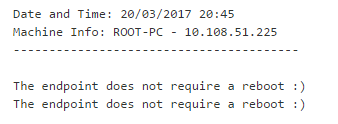
Sample Output:
Thank you.
20170320-Reboot-Required-14-days-and-Win-Update.json (3.08 KB)
Thanks, Purushothaman. Just want to check on a couple of things for my own understanding. The script references a .vbs and a .ps1 file … does it create those itself or are they there by default? I’ve copied and pasted the text in the code box into a new Procedure, edited the user’s message and saved. Once scheduled, that’s all it should need, yes?
(Oh, and it should be “The endpoint doES not require reboot”. Typo)
Hi @PromptCare,
The files .vbs and .ps1 are not by default and they will be created by the script and at the end of the script execution, they will be removed. .vbs is for checking whether the reboot is pending after the windows update and .ps1 file to get the number of days passed after the endpoint was restarted.
The message “The endpoint does not require a reboot” is updated on the script.
For any clarification regard this, please let me know
Thank you.
What about a script that installs the Patch Manager (not the ITSM Patch Manager but the Other Patch Manager) - that deploys it - since its not a simple deploy msi file, but requires a complex command unique to your account, it would be nice if ITSM could Install the regular patch manager just like it has the ability to install RMM “Other Comodo software” and Comodo Security Suite, etc., that is linked to the right account, or at least have a way to deploy it straight from your account once ITSM is installed.
Hi @navcom
We can do the scripts provided necessary information. Please refer forum private message where i have requested details to you.
Thanks,
Kannan
Hi @navcom
What about a script that installs the Patch Manager (not the ITSM Patch Manager but the Other Patch Manager) - that deploys it - since its not a simple deploy msi file, but requires a complex command unique to your account, it would be nice if ITSM could Install the regular patch manager just like it has the ability to install RMM “Other Comodo software” and Comodo Security Suite, etc., that is linked to the right account, or at least have a way to deploy it straight from your account once ITSM is installed.
Please refer procedure ITarian Forum - ITarian Forum
Also please share if have something else that needs to be automated.
Decided to implement this as a lot of people were complaining me changing the Patch Management settings to “ask client and allow them to postpone”…
First two PCs running it: “Procedure process exited unexpectedly” from one; no other info. Next one has:
Traceback (most recent call last):
File “<string>”, line 44, in <module>
ValueError: invalid literal for int() with base 10: ‘’
Hi @PromptCare,
Please let me know the computer’ OS and PowerShell version for the 2 machines you have tried
FYI, I have checked the script in windows 7, 8.1 and 10 and the script which works as expected.
Thank you.
How about a script that is rollup of all standard desktop maintenance best practices to improve performance and clean up? Like empty recycle bin, clean up all temp files, defrag disk (if not an SSD), (open to other suggestions) so that it could be something that was automatically run on all machines once per month just to keep them running as well as possible?
Hi @indieserve
We suggest following operations in the maintenance script. You would be able to schedule script procedure using ITSM profiles.
Thanks
I’ve had about 10% failure on that script so far. Picking from them, I’m looking at one that gave “Procedure process exited unexpectedly” and he’s running Win7 Home Premium (6.1.7601) and PS version 2.0. Another with the same error is on 10 Home (10.0.14393) and shows PS versions 2.0 and 5.1.14393.0
I found another with "Traceback (most recent call last):
File “<string>”, line 63, in <module>
WindowsError: [Error 32] The process cannot access the file because it is being used by another process: ‘C:\Users\Summer\AppData\Local\Temp\checkboottime.ps1’
…and it’s running 10 Pro (offline so I can’t check PS version)