Hi @PromptCare,
We will check the script with the environment as you use and mentioned here and tell you status as soon as possible.
Thank you.
Hi @PromptCare,
We will check the script with the environment as you use and mentioned here and tell you status as soon as possible.
Thank you.
I’ve tracked down that some/most of those on which it’s failing are running Avast as their AV and the CheckBootTime.PS1 is being flagged as “IDP.ALEXA.51”
Incidentally, it’s flagging the most recent Skype update in Patch Management the same way.
Any word on progress on this one? Also, as I’m getting a little more familiar with reading the code, does it actually open a window on the desktop asking the client to reboot or just log that it needs one? A window was the original request.
Clients are complaining left, right, and center about the Please Reboot prompts coming from the Profile (even though WU would show a near-identical prompt) so I have to turn it off. I’m getting no work done.
If the script doesn’t show the client a window, can that be done? And can it show them the Uptime ("Your system has not had a fresh startup in " + $Uptime.days) ?
How about a script to check on the success/failure of comodo backup?
@computerexperts Comodo Backup is apparently deprecated. Acronis is the backup partner of choice; Comodo is looking different licensing for local only due to some requests. I’m in a situation where Acronis isn’t an option for me due to data residency requirements of my customers unfortunately. Looks like a good product.
Sorry for the inconvenience, As we have checked the script with Windows 7 Home and Windows 10 Home, the script did not support to send alert message to the logged in user.
So we will discuss and let you know the right script, but now we are debugging the script.
Thank you.
Now we have modified the script and would like to provide some details about the script with necessary screenshots.
Please run the script as “Logged in User”
days=14
def ecmd(CMD, OUT=False):
    import ctypes
    class disable_file_system_redirection:
        _disable = ctypes.windll.kernel32.Wow64DisableWow64FsRedirection
        _revert = ctypes.windll.kernel32.Wow64RevertWow64FsRedirection
        def __enter__(self):
            self.old_value = ctypes.c_long()
            self.success = self._disable(ctypes.byref(self.old_value))
        def __exit__(self, type, value, traceback):
            if self.success:
                self._revert(self.old_value)
    from subprocess import PIPE, Popen
    with disable_file_system_redirection():
        OBJ = Popen(CMD, shell = True, stdout = PIPE, stderr = PIPE)
    out, err = OBJ.communicate()
    return out.strip()


def wfile(fp, c):
    import os
    with open(fp, 'w') as f:
        f.write(c)
    if os.path.isfile(fp):
        return fp
    return

import os
import time
import socket
c=r'''Set objSysInfo = CreateObject("Microsoft.Update.SystemInfo")
Wscript.Echo "" & objSysInfo.RebootRequired'''
p=r'''$os = Get-WmiObject win32_operatingsystem
$uptime = (Get-Date) - ($os.ConvertToDateTime($os.lastbootuptime))
$uptime = (Get-Date) - ($os.ConvertToDateTime($os.lastbootuptime))
Write-Output $Uptime.Days'''

fp=os.path.join(os.environ['TEMP'], 'RebootRequired.vbs')
pf=os.path.join(os.environ['TEMP'], 'checkboottime.ps1')
file=wfile(fp, c)
filep=wfile(pf, p)
vbsout=[i.strip() for i in ecmd('cscript "'+file+'"').split('
') if i.strip()][-1]

##print vbsout
pcmd='PowerShell.exe -ExecutionPolicy Bypass -File %s'%(filep)
psout=int(ecmd(pcmd))
##print psout

tim=time.strftime('%d/%m/%Y %H:%M')
cn=os.environ['COMPUTERNAME']
ip=socket.gethostbyname(socket.gethostname())
print 'Date and Time:', tim
print 'Machine Info:', cn+' - '+ip
print '-'*40

if vbsout=='True' or psout>=days:
    def alert(input_text):
        c1=r'''MsgBox "%s"'''%(input_text)
        u=r'''Set objNetwork = CreateObject("Wscript.Network")
Wscript.Echo objNetwork.UserName'''
        pm=os.path.join(os.environ['TEMP'], 'messagealert.vbs')
        pu=os.path.join(os.environ['TEMP'], 'finduser.vbs')
        filem=wfile(pm, c1)
        fileu=wfile(pu, u)
        ecmd('cscript "%s"'%filem)
        user=ecmd('cscript "%s"'%fileu)
        print 'The following alert message is sent to the user "%s"'%([i.strip() for i in user.split('
') if i.strip()][-1])
        print input_text
        os.remove(filem)
        os.remove(fileu)
        return
    if vbsout=='True':
        alert('Please reboot your system! Because the system was not restarted after the Windows Update was complete.')
    elif psout>=days:
        alert('Please reboot your system! Because your system has not had a fresh startup in %s days.'%str(psout))
else:
    print 'No alert is sent to the user. Because,

The system uptime is only %s days.
And It has no pending restart as well.'%str(psout)

os.remove(file)
os.remove(filep)
Usage:
you can set any number of days that the up time of the system on the line of code
days=14
Explanation:
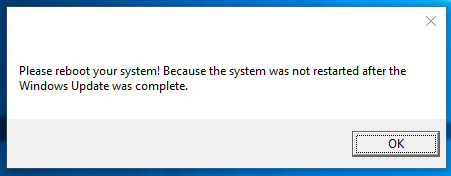
Case 1:
If the system is pending to restart after windows update is complete,
Alert message would be,
and Execution log at ITSM would be,
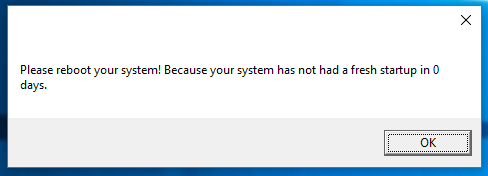
Case 2:
If the system is not pending to restart but the system up time is more than 14 days (days can be modified),
Alert message would be,
and the Execution log at the ITSM would be,
Note: For testing purpose I have set days=0 and also the same has been replicated on alerts and logs
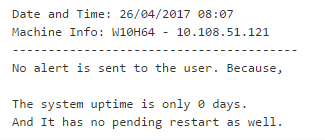
Case 3:
The system has no pending restart and has the less number of up time in days,
No alert message is sent to the user
And the Execution log at the ITSM would be,
Continues on next post

Script in JSON format:
Thank you.
20170426-Reboot-alert-if-Windows-Update-or-14-days-Uptime.json (4.19 KB)
This looks like it should be exactly what I’m looking for BUT my goal is to put it into a profile and have it run every day at 5pm. Unless I’m missing it, there is no way in a profile to designate which procedures run as User and which run as System. I assume, for Patches, etc that they all run as System – is that correct?
Which means that any script that requires being run as the User must, currently, be run manually. Can that be fixed in ITSM?
Unless a scripted procedure can be run as System and, from within its own script, run a sub-script as the User.
Hi @PromptCare
Do you want to run or schedule procedure as specific user ?
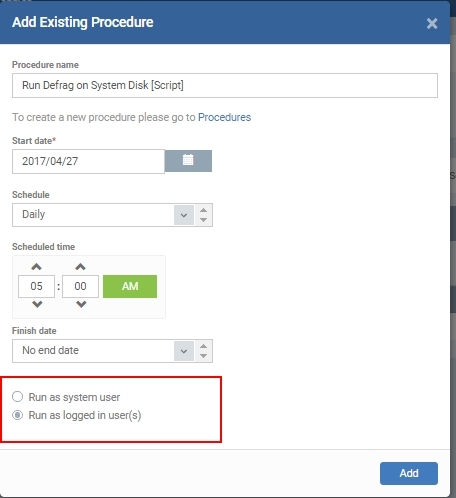
As of now, you can run or schedule script procedure as “System user” or "logged in user "
The script will not start if there is no active login user in the system when you run as 'logged in user",
Please refer screenshot
Aha, that option is only available when adding a new procedure to a profile; not when editing.
I believe you want to change “Run as User” option after script procedure being scheduled in profiles. Is that right?
I think, ideally, the best place to make a change would be in the Procedure itself – to be able to designate at the source what authority to use when running.
And, other than that, having the option in the Profile’s Procedure list while editing wouldn’t hurt.
Hi @PromptCare
For now, please delete and reschedule same procedure if you want to change “Run as user” .
I will contact support team regarding this feature request and update you soon.
Thanks,
Kannan
I have a request, I am building many auto remediation scripts, and have found a snag. Since we can only run one procedure in the remediation section of our monitors, I have been building some procedures that are all inclusive, and do tons of stuff. The issue is I have been getting a lot of errors from files being is in use and the such, so I need to log the user off, before the all inclusive procedures are running. Now the issue would seem to be that the script I made to log the users off, has to run as the user, but a lot of the other stuff in the procedures has to have system rights. Is there a way to alleviate this conundrum?? When I set up the individual procedures, I have them with the correct permissions, and they work, but when I put them all in one procedure, so I can do many things with my auto remediation, not everything will run as expected, since I need a mix of access levels.
Hi @BOSS
By default, auto-remediation procedure is running as system user. It is great that you are trying to build auto-remediation script that does a lot of tasks.
Yes, as of now we can set only one procedure as auto-remediation.
I will forward your request to have a mix of access levels. But I suggest you build auto-remediation procedure as system user level alone. (only one kind of access level).
The issue is I have been getting a lot of errors from files being is in use and the such, so I need to log the user off, before the all inclusive procedures are running
We can include function in system user procedure to stop services or processes that prevents file access . Also you can make system user procedure to get login session details from the system to log off desired user.
Let us know your feedback or script requests if need.
Thanks,
https://code.google.com/archive/p/namebench/
We would like to test the name resolution on the client from the DNS servers and the latency/reliability of getting responses and resolution. It should be able to so we can tag the cached ones from from the rest. It should include currently configured DNS servers and add the others that we provide from a list and run the tests against those. A good start for the output can be a file including at the least the client info along the DNS server and the response calculated along success/failure info with their associated times so we an deduce reliability from that information. We would also like to store the name resolution responses that we got from the servers along with time stamps in a log file that can be parsed.
Namebench does most of that and has command line options.
The idea is to script it out so we can automate the testing and collect the data.
Thank you.
